
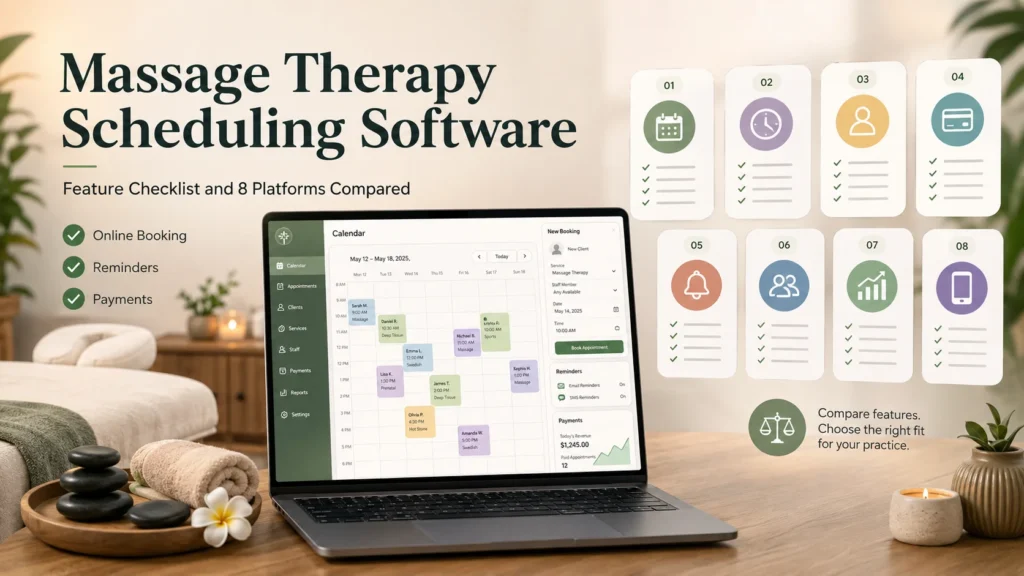
Most software comparisons written for this profession begin with the vendor list, which is the wrong order to work in. A massage clinic has a fairly specific set of operational problems, and until those problems have been written down, every demo looks impressive, and every feature page looks complete. For that reason, this guide begins with the checklist, and it works through the individual platforms afterwards.
The clinical side of the work is part of the reason the checklist looks the way that it does. According to the profession’s own industry survey, 42% of consumers who booked a massage in the past year did so for chronic pain relief and management, and a further 36% did so for injury recovery or rehabilitation. That is a client base that arrives with health histories, contraindications, and treatment plans attached to it, and a general-purpose appointment application is not designed to hold that sort of information.
How We Built This List
We began by collecting the questions that buyers actually put to these platforms during an evaluation. Six of them came up repeatedly, and they were these: what the transaction fees really amount to, whether the calendar synchronizes in both directions and appears in Google, how staff scheduling copes with more than one therapist, whether the integrations cost extra, what the no-show protection actually does in practice, and how deposits are taken and later refunded. The last two are the questions that vendors answer least clearly on their own websites, and they are also the two that determine whether an unfilled Tuesday afternoon costs the practice money.
From there we built the checklist that follows, and then we measured eight platforms against it. The ratings quoted are the current overall scores on Capterra, given with the review count, because a 4.8 from 626 reviews and a 4.8 from 30 reviews are not the same thing. Pricing is the lowest publicly listed plan at the time of writing. Every entry carries at least one real limitation, including the platform we ranked first.
There is one caution worth stating before the checklist itself. Published feature lists in this category have a habit of running some way ahead of the actual product. A capability is announced, the marketing page is updated to describe it, and the working version arrives months afterwards, or else it arrives with restrictions that nobody wrote down anywhere. A feature page is best treated as a claim to be tested during a free trial, rather than as a specification.
The Checklist: What A Massage Practice Should Insist On
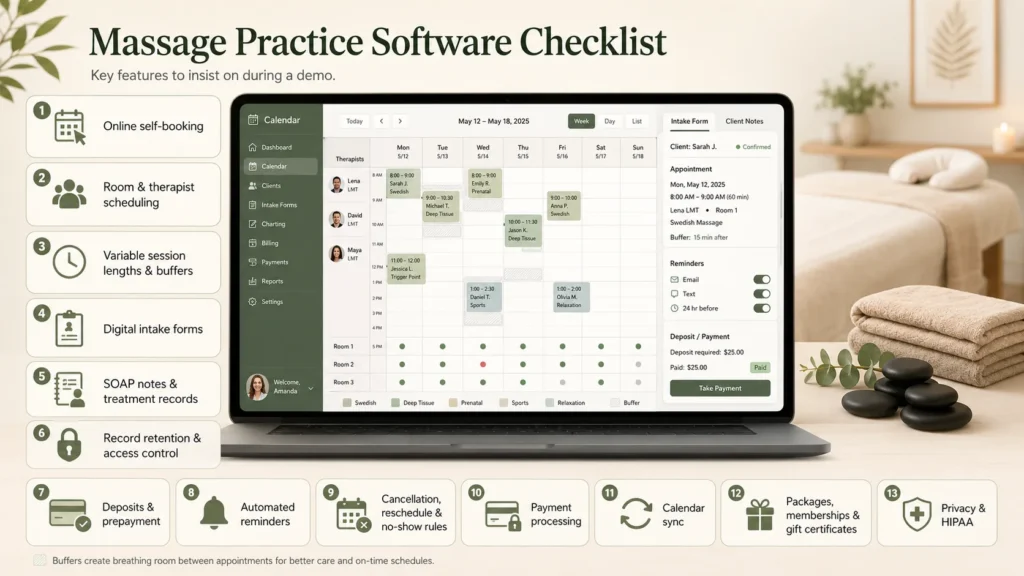
Each item below is written so you can carry it into a demo and ask for it to be shown, not described.
Online self-booking. A client-facing booking page or embedded widget that works around the clock, on a phone, without the client calling or emailing. Look for a widget that sits inside your own site rather than opening a branded pop-up, because the pop-up versions leak trust at exactly the wrong moment.
Room and therapist scheduling. A massage appointment is rarely a single resource, because it requires a qualified therapist as well as an equipped room, and the two do not always come as a pair. A hot stone session, for example, needs a therapist who is trained for it and a room that has a working stone warmer in it. If the calendar is only able to book people and not places, then you will eventually double-book the room, and you are likely to find out about it at the point when the client is already sitting in reception.
Variable session lengths and buffers. Practices run 30, 60, 75, and 90-minute sessions, sometimes 15- or 20-minute chair work, and the software needs to price and schedule each differently. It also needs non-bookable buffer time, usually about 15 minutes, so the therapist can write up, reset the table, and wash their hands without the next client already sitting down.
Digital intake forms. A health history captured before the client arrives rather than on a clipboard in the waiting room. The useful versions are modality-specific, so a prenatal intake asks different questions than a deep tissue or sports intake, and the answers land attached to the client record rather than in an email inbox.
SOAP notes and treatment records. SOAP stands for Subjective, Objective, Assessment and Plan, and it is the standard structure for clinical charting in manual therapy. Not every practice needs it inside the booking system, but every practice that bills insurance, takes referrals from other health professionals, or treats injury cases will want the note attached to the appointment rather than living in a separate file.
Record retention and access control. A client file is a clinical record as well as a contact record, and it carries obligations that a marketing list does not. Under the board’s standards of practice, board-certified therapists are expected to securely retain client files for a minimum period of four (4) years from the termination of the therapeutic relationship, and to keep client information confidential. In a multi-therapist clinic that translates into a practical software question: can you set permissions so a therapist sees their own clients’ notes and not everyone’s?
Deposits and prepayment. The ability to take a fixed amount, a percentage, or the full session fee at the moment of booking. The system should also let you vary that by service, so a 90-minute treatment can carry a deposit while a 30-minute add-on does not.
Automated reminders. Email and text messages sent at intervals you set, typically one at booking, one a few days out, and one the day before. Confirm what the text messages cost, because most platforms sell them as credits on top of the subscription.
Cancellation, reschedule, and no-show rules. Clients should be able to move their own appointment inside a window that you define, and the software should enforce whatever you have decided happens outside that window. Two parts matter more than the rest: the policy wording that the client agrees to at the point of booking, and the ability to charge a card that is already held on file afterwards, without having to chase anybody for it.
Payment processing, online and at the desk. Card and wallet payments at booking, plus a point of sale for walk-ins, retail, and tips, so online and in-clinic revenue reconcile in one place instead of two. Check whether you can keep your own payment processor or whether the platform forces its own, because forced processing is where the per-transaction cost usually hides.
Calendar sync. Two-way synchronization with Google Calendar, Apple Calendar or Outlook, so a therapist’s personal commitments block clinic availability automatically. One-way sync is common and is not the same thing.
Packages, memberships and gift certificates. Prepaid bundles, recurring memberships with member pricing, and gift vouchers that can be sold online and then redeemed in person. For a clinic these are normally where the repeat revenue comes from, so they are worth checking properly rather than treating as a bonus.
Privacy posture and the HIPAA question. HIPAA does not apply to every massage practice by default. A health care provider is covered only if it transmits health information electronically in connection with a transaction for which a standard has been adopted, which is the test set out in the federal guidance on covered entities. In plain terms, a cash-and-card practice that never bills insurance electronically is usually outside the rule, while a practice that submits claims usually is not. Either way, ask the vendor where the data is hosted, whether it is encrypted, and whether they will sign a business associate agreement if you need one.
The Platforms At A Glance
| Platform | Best for | Starting price (per month) | Capterra rating |
| Bookeo | Booking, rostering and payments, with charting kept elsewhere | $14.95 | 4.3 (103 reviews) |
| Noterro | Clinics where the chart drives the workflow | $30 | 4.8 (626 reviews) |
| ClinicSense | Solo therapists and small clinics wanting charting plus retention tools | $39 | 4.8 (662 reviews) |
| Jane | Multi-discipline clinics with massage alongside physio or chiro | $54 | 4.8 (505 reviews) |
| MassageBook | Massage-only practices that also want directory exposure | $20 | 4.7 (448 reviews) |
| Boulevard | Larger spa-style practices with a front desk and retail | $176 | 4.6 (375 reviews) |
| Vagaro | Mixed wellness businesses where massage sits beside hair or fitness | $23.99 | 4.7 (3,647 reviews) |
| Mindbody | Multi-location wellness groups with classes and a marketplace strategy | $79 | 4.0 (2,993 reviews) |
Eight Platforms Measured Against The Checklist
1. Bookeo
Bookeo is primarily a booking engine rather than a practice management system, and how a clinic feels about that distinction will largely decide whether it belongs on the shortlist. The rostering model is the part that stands out for this profession, because you assign a specific therapist to a specific service in a specific location, with working hours set for each therapist individually, which is about as close as anything on this list gets to treating people and places as separate bookable resources.
- Self-booking widget embedded in your own site, or a standalone branded booking page.
- Therapist and location rostering, variable session durations and prices, buffers, recurring bookings.
- Paperless intake forms attached to the client record, with digital waivers as a priced add-on.
- Deposits, full prepayment or pay-later through Stripe, Square and PayPal, plus prepaid packages, memberships and gift vouchers.
Rating: 4.3 out of 5 on Capterra across 103 reviews.
Pricing: Appointment plans listed from $14.95 per month for Solo up to $79.95 for Large, with a 30-day free trial and no credit card required. Digital waivers and text message credits are charged on top.
Where it falls short: there is no SOAP charting or clinical note-taking in the product. Intake forms and waivers are present, but a treatment note attached to the appointment record itself means running a second system alongside this one.
2. Noterro
Noterro was built for manual therapy clinics, and in this product the chart is the center of the workflow rather than something bolted onto the side of it. Therapists who have used it tend to report the same thing, which is that the note, the body diagram and the appointment all sit in the same place, so writing up between clients is quick enough that it actually gets done.
- SOAP notes and charting with body diagrams, built for massage, physio and chiropractic workflows
- Online booking with intake forms sent ahead of the appointment
- Calendar synchronization with Google and Outlook
- Billing, invoicing, and insurance handling, plus a client portal
Rating: 4.8 out of 5 on Capterra across 626 reviews.
Pricing: Core at $30 per month, Plus at $50, Max at $70.
Where it falls short: reviewers report occasional slow loading and inconsistent behavior across devices, and the billing and payment side is the most commonly criticized part of the product, with several of them noting that the insurance and payment options lack flexibility. Initial configuration also involves a large number of steps, so you should budget real time for the setup rather than assuming it can be done in an evening.
3. ClinicSense
If you are a solo therapist or you run a two-room clinic, ClinicSense is probably the product on this list that covers the largest share of the checklist in one place. It carries the clinical documentation you would expect from a massage-specific tool, and it pairs that with the rebooking and retention side, which is the part that most charting-first products tend to ignore.
- SOAP notes with customizable templates and a client portal for intake
- Online booking and rescheduling, with email and text reminders
- Payment processing and invoicing
- Marketing automation aimed at rebooking and lapsed clients
Rating: 4.8 out of 5 on Capterra across 662 reviews.
Pricing: Lite at $39 per month for one practitioner with a 20-appointment cap, Standard at $69 for 200 appointments with additional practitioners at $20 each, Premium at $99.
Where it falls short: the mobile application is the weak point, and reviewers say so fairly plainly, describing it as slower and less capable than the desktop version. Invoice formatting is also less configurable than some practices would like it to be. The appointment caps on the lower plans are worth reading twice as well, because a busy solo therapist will pass 200 appointments in a month.
4. Jane
Jane makes the most sense when massage is one of several disciplines operating under the same roof. It is a full practice management system, and the charting, the scheduling and the patient portal are all built around the assumption that different practitioner types will be sharing a diary and a room list between them.
- Charting with customizable templates, built for multi-discipline clinics
- Self-booking with availability rules per practitioner
- Automated email and text reminders
- Room management and waitlists on the higher tier, plus built-in one-to-one video consultations
Rating: 4.8 out of 5 on Capterra across 505 reviews.
Pricing: Balance at $54 per month with a 20-appointment limit, Practice at $79 for unlimited appointments, Thrive at $99 for the room management and waitlist features.
Where it falls short: room management sits on the most expensive tier, which is awkward for exactly the clinic-sized practice most likely to need it. Reviewers also report that the billing and payment functions are confusing, that reporting is harder than it should be, and that the system does not offer two-way calendar synchronization with outside platforms, which fails one of the checklist items above.
5. MassageBook
MassageBook is built for massage only, and that focus is visible in the vocabulary and in the default settings. The product also lists your practice in its own consumer directory, which is a marketing channel that some owners value a great deal and others find largely irrelevant, depending on how referrals reach them locally.
- SOAP notes for client documentation, plus intake forms
- Online booking with calendar synchronization to Google Calendar
- Automated email and text reminders
- Payment processing, gift certificate management, and email marketing campaigns
Rating: 4.7 out of 5 on Capterra across 448 reviews.
Pricing: Transition at $20 per month, Simplify at $40, Amplify at $50, with a free trial available.
Where it falls short: the payment layer is the recurring complaint. Reviewers describe missing card storage, limited flexibility in processing, and problems with tap-to-pay, which is a meaningful gap if you take a lot of walk-in payments at the desk. Several also mention recurring technical glitches, and the email campaign editor is basic compared with a dedicated marketing tool.
6. Boulevard
Boulevard is a front-desk product, in the sense that it was built for businesses that have a receptionist, a retail shelf, and a full day of overlapping appointments, and both the scheduling and the point of sale reflect that assumption. For a two-room massage practice, it is almost certainly more system than the practice requires.
- Appointment scheduling and calendar management built around a staffed front desk
- Online booking with automated confirmations and reminders
- Integrated point of sale, client profiles and automated messaging
- Multi-location management on the higher tiers
Rating: 4.6 out of 5 on Capterra across 375 reviews.
Pricing: Essentials at $176 per month, Premier at $293, Prestige at $410, with an aesthetics bundle at $421 and custom enterprise pricing.
Where it falls short: the first issue is cost, since the entry plan is roughly five times the price of the cheapest option on this list, and reviewers specifically flag what multi-location management costs. Beyond that, the most consistent criticism is operational stability, with recurring glitches reported and client text replies that do not always synchronize between the mobile application and the desktop version. Ease of use and customer support both score well, so the friction here is about reliability rather than usability.
7. Vagaro
Vagaro is the broad wellness option on this list, and it covers salon, spa, fitness, and massage within a single product, which is genuinely useful if your business happens to be more than one of those things and somewhat diluting if it is only massage. The scale of the review base is also worth noting, because 3,647 reviews is a considerably larger evidence pool than most of the other products here have behind them.
- Appointment management, online booking and calendar management across multiple service types
- Automated confirmations and reminders, client database and mobile access
- Payment processing with point of sale for retail and walk-ins
- Marketing and package tools shared across service lines
Rating: 4.7 out of 5 on Capterra across 3,647 reviews.
Pricing: from $23.99 per month for a single location, with custom pricing for multiple locations and a free trial available.
Where it falls short: reliability comes up repeatedly in the reviews, with one reviewer stating fairly flatly that the bugs and glitches make the software hard to use. Payment handling attracts complaints about delayed deposits and confusing refund procedures, and the booking widget offers only fairly basic branding options. There is also a real learning curve attached to the advanced configuration, and that is precisely the part a multi-therapist clinic will need to get right.
8. Mindbody
Mindbody appears on very nearly every roundup published in this category, and that is a large part of why it sits at the bottom of ours rather than the top. It is a capable platform for multi-location wellness groups that are running class schedules alongside appointments, and it has a consumer marketplace attached to it. For an independent massage clinic, however, the fit is poor, and the economics are worse than the fit.
- Appointment and class management with online booking
- Automated confirmations and reminders, client database, mobile access
- Payment processing, reporting and analytics
- Email and text marketing, plus exposure through the consumer app
Rating: 4.0 out of 5 on Capterra across 2,993 reviews, the lowest score in this comparison.
Pricing: Starter at $79 per month as a flat rate, with Accelerate and Ultimate on custom pricing. There is no free trial and no free version.
Where it falls short: the review sentiment is unusually consistent. Pricing is described as expensive, as rising over time, and as hard to predict once the add-ons have been counted. Technical stability attracts heavy criticism, with crashes and slow loading both reported. The cancellation and refund process is the single most complained-about element of the product, and it is described as slow and inflexible by a large share of reviewers who mention it. The absence of a free trial also means that you cannot test any of the checklist items above before you commit to the platform.
Clinic Must-Haves Versus Solo Nice-To-Haves
The checklist does not weigh the same for everybody, and the split between must-have and nice-to-have is not really about revenue at all. It is about how many people and how many rooms are involved in the operation.
A solo therapist working out of one room can manage perfectly well without resource scheduling, permission controls, or multi-location reporting. What that therapist cannot manage without is self-booking, automated reminders, a deposit rule, and somewhere sensible to keep intake forms. Charting matters if the practice takes referrals or bills insurance, and it matters a good deal less if it does not.
As soon as a second therapist joins, four items move from optional to structural. Room and resource scheduling becomes necessary because two therapists and one hot stone room is a conflict waiting to happen, and permission controls become necessary because client notes should not be visible to everyone who holds a login. Rostering has to be set per therapist, since availability is now individual rather than universal, and utilization reporting starts to matter, because a team diary that you cannot see is a team diary you cannot manage.
Franchises and multi-site groups then add centralized reporting and consolidated client records on top of all of that, and this is the point at which the more expensive platforms start to earn their price. Below that threshold, paying for multi-location architecture that you will never actually use is the most common way that clinics overspend in this category.
How To Score A Shortlist Without Losing A Month To Demos
Print the checklist out, put your three finalists across the top of it, and score every item as yes, partial or no. It is a dull exercise, and it is a good deal faster than sitting through three sales calls and then trying to remember afterwards which of them had the room scheduling.
After that, work through the following during the free trial rather than during the demonstration. Book a real appointment through the client-facing page using a phone rather than a laptop. Take a real deposit and then refund it, so that you have seen the payment flow run in both directions. Send a real intake form to your own email address and check where the answers end up. Create two therapists and one shared room, then attempt to double-book that room deliberately and see whether the system stops you. Cancel an appointment outside the policy window and confirm that the card held on file can actually be charged. Those five tests will find more problems than an hour of feature comparison ever will.
It is worth being specific about what you are optimizing for, because these platforms differ in shape as well as in price. If clinical documentation is the center of your practice, then the charting-first products belong at the top of your list. If you are shopping for massage therapy scheduling software and your treatment notes already live somewhere that you are happy with, Bookeo covers the booking, the therapist and room rostering, the deposits, and the packages at a lower monthly cost, which is a reasonable trade for a practice that does not want charting bundled into the same subscription.
There is one last piece of advice on cost. Model the price at one and a half times and at two times your current size before you sign anything at all. Per-practitioner fees, appointment caps and text message credits all scale up with you, and the plan that looks cheapest at your current volume is quite often not the cheapest at the volume you are aiming for.
The Bottom Line
There is no single best platform in this category, and a list that presents one is usually selling something. What there is instead is a checklist, and eight products that satisfy different parts of it at quite different prices.
If the treatment note is the center of your practice, then look hard at the charting-first products. If the diary, the rooms and the money are the actual problem and the notes are already handled elsewhere, the booking-first products will cost you less and will get in your way less often. If you are running several locations and several service types, you are in the market for the expensive end of this list, and the thing to test is stability rather than features, because stability is where the complaints concentrate.
Whatever you end up shortlisting, run the five trial tests described above before you move your client list across. Migrating twice is the expensive mistake to make here, and it is usually avoidable.
Frequently Asked Questions
What Does A Massage Clinic Need That A General Scheduling App Does Not Have?
There are three things in particular. The first is resource-aware scheduling, meaning a calendar that treats the treatment room as a bookable resource in the same way that it treats the therapist. The second is intake forms that capture the health history and any contraindications before the client arrives. The third is somewhere structured to keep treatment records. A general-purpose appointment application will handle the calendar and the reminders perfectly well, and it will then leave you managing rooms on a whiteboard and health histories in a filing cabinet.
Is SOAP-Note Support Necessary For Every Massage Practice?
It is not necessary for every practice. It becomes necessary when you bill insurance, when you take referrals from other health professionals, or when you treat injury and rehabilitation cases where the treatment plan runs across multiple sessions. A relaxation-focused practice that takes card payments and never files a claim can reasonably keep simpler client notes instead. The record-keeping obligations in the professional standards still apply in either case, so “no SOAP notes” is not the same thing as “no records.”
What Is The Single Most Effective Feature For Reducing No-Shows?
The most effective single measure is taking money at the time of booking. Reminders do help, and you should certainly turn them on, but a reminder only prompts a client who already intended to attend, whereas a deposit changes the decision itself. The practical combination that most clinics settle on is a modest deposit on the longer treatments, a card kept on file, a clearly worded cancellation window, and automated reminders sent at the point of booking and again on the day before.
What Should A Deposit Rule Actually Cover?
A deposit rule should cover four things. The first is the amount, which can be a flat figure, a percentage, or the full session fee. The second is which services it applies to, since a 90-minute treatment and a 30-minute add-on do not warrant the same level of commitment from the client. The third is the cancellation window within which the deposit is refunded automatically. The fourth is what happens outside that window, meaning whether the deposit is retained, whether the card on file can be charged for the balance, and who in the practice has the authority to waive it. If the software cannot express all four of those, you will end up enforcing the policy by hand.
Does Massage Scheduling Software Have To Be HIPAA Compliant?
It depends on your practice, not on the software. The federal test is whether you transmit health information electronically in connection with a covered transaction, which in practice usually means electronic insurance claims. If you do, you need a vendor that will sign a business associate agreement. If you do not, HIPAA may not apply, but state law, professional standards and simple client trust still expect encrypted storage, access controls, and secure retention of client files. Ask the vendor where the data is hosted and what the encryption and backup arrangements are, regardless of which side of the line you fall on.